A classroom full of ideas. A language to bring them to life.
Bring learners together in a local-network lesson, approve participation and discuss code they choose to share. Pliro Classroom combines these teacher tools with Dutch and English programming in a managed desktop environment.
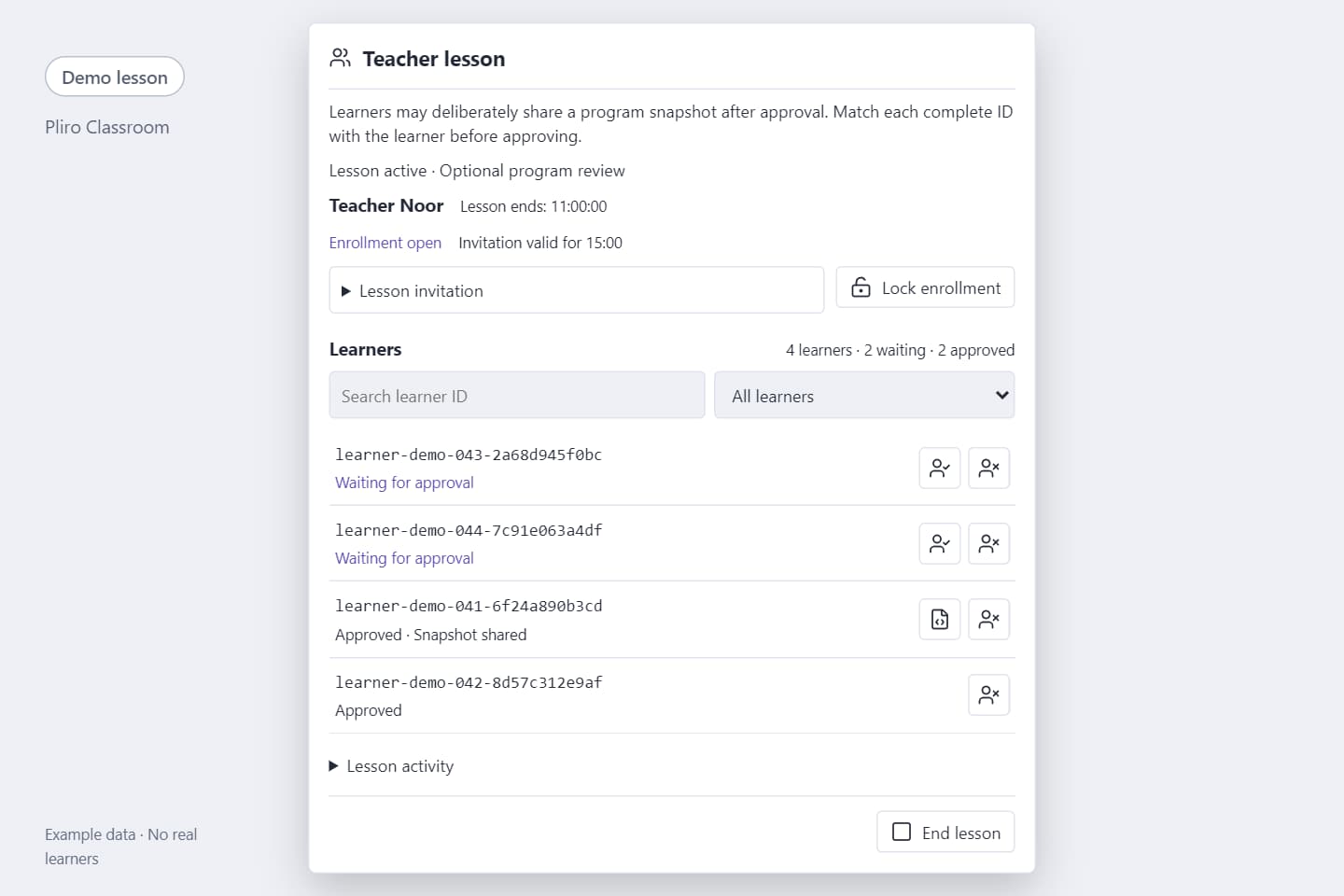
Illustrative Classroom demo with example learners; no live school data.
authorised educator per licence
1
IDE activations with Classroom
2
Classroom, per year excl. VAT
€149
For schools
Bring the class together. Talk through their code.
These teacher and learner tools are available in configured desktop deployments. Begin with participation, then add program review when separately authorised.
01
Host a lesson
Start a lesson on the local network and share its invitation. End the lesson to close participation for everyone.
02
Approve each learner
Match the complete learner ID before approving that learner individually. Learners can see their teacher and approval status.
03
Manage participation
Search and filter waiting and approved learners, lock enrolment or remove a participant. Lesson membership activity is cleared when the lesson ends.
04
Let learners choose what to share
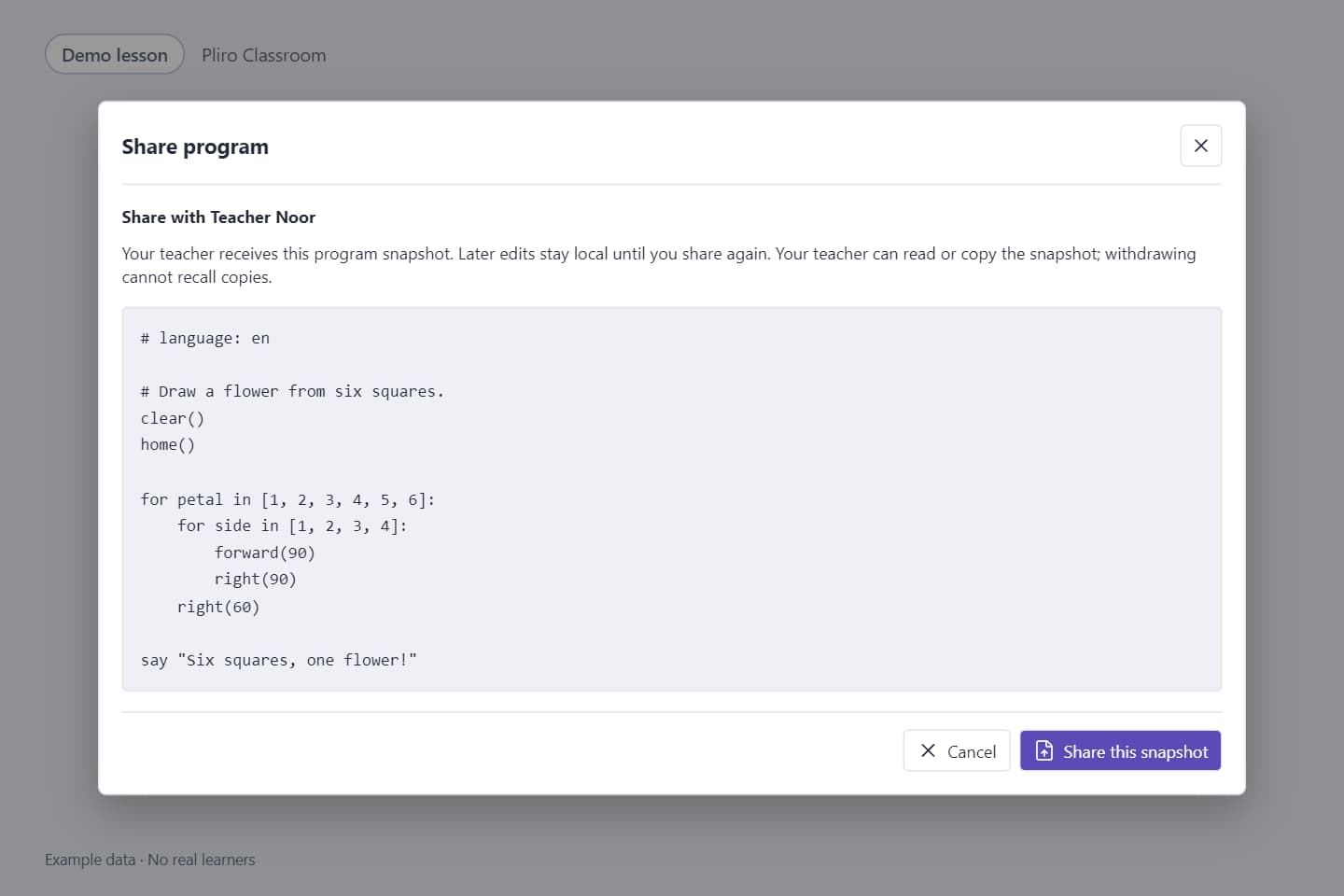
In a lesson authorised for program review, approved learners preview and confirm a selected program snapshot from a saved copy of the same lesson project, including current code changes.
05
Read and discuss a program
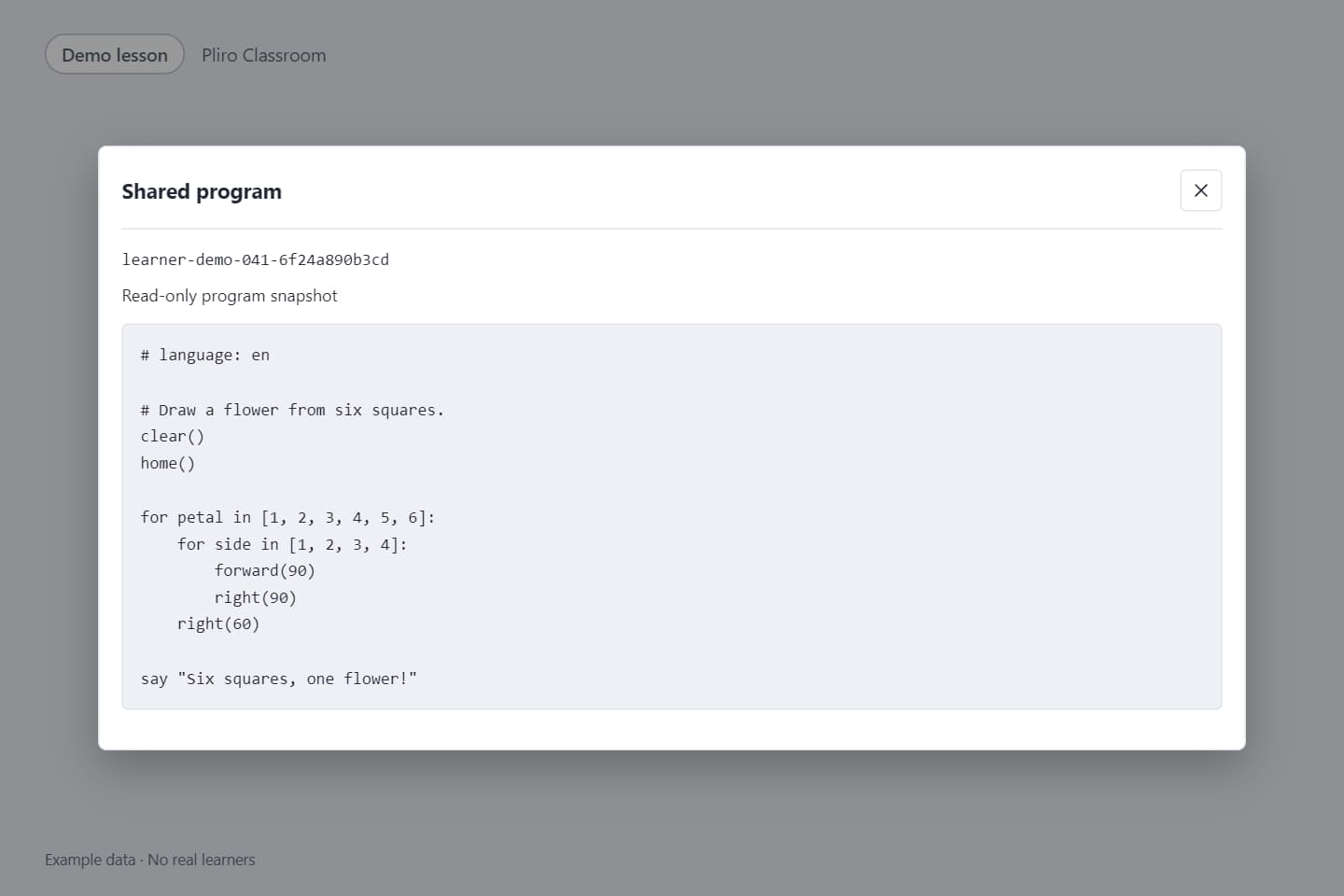
Open the latest learner-confirmed snapshot in a read-only window. Ordinary edits remain local until the learner explicitly shares again; there is no live code stream, remote editing or execution.
06
Withdraw or leave
Learners can withdraw shared code while staying in the lesson, or leave at any time. Withdrawal, removal or lesson end clears the shared copy and review.
Only the selected program text is shared. Files, images and running output remain on the learner’s computer. Withdrawal cannot recall text that has already been read or copied.
PLIRO / CLASSROOM
Let learners choose what to share
In a lesson authorised for program review, approved learners preview and confirm a selected program snapshot from a saved copy of the same lesson project, including current code changes.
Open the latest learner-confirmed snapshot in a read-only window. Ordinary edits remain local until the learner explicitly shares again; there is no live code stream, remote editing or execution.
01 / Let learners choose what to share02 / Read and discuss a program
Illustrative Classroom demo with example learners; no live school data.
A lesson you can picture
From a prediction to “I made this”.
A 45-minute lesson can start with one small program. Let pupils predict, run, investigate, modify, and make, using the structure described in Pliro’s school materials.
PLIRO / PLAYGROUND
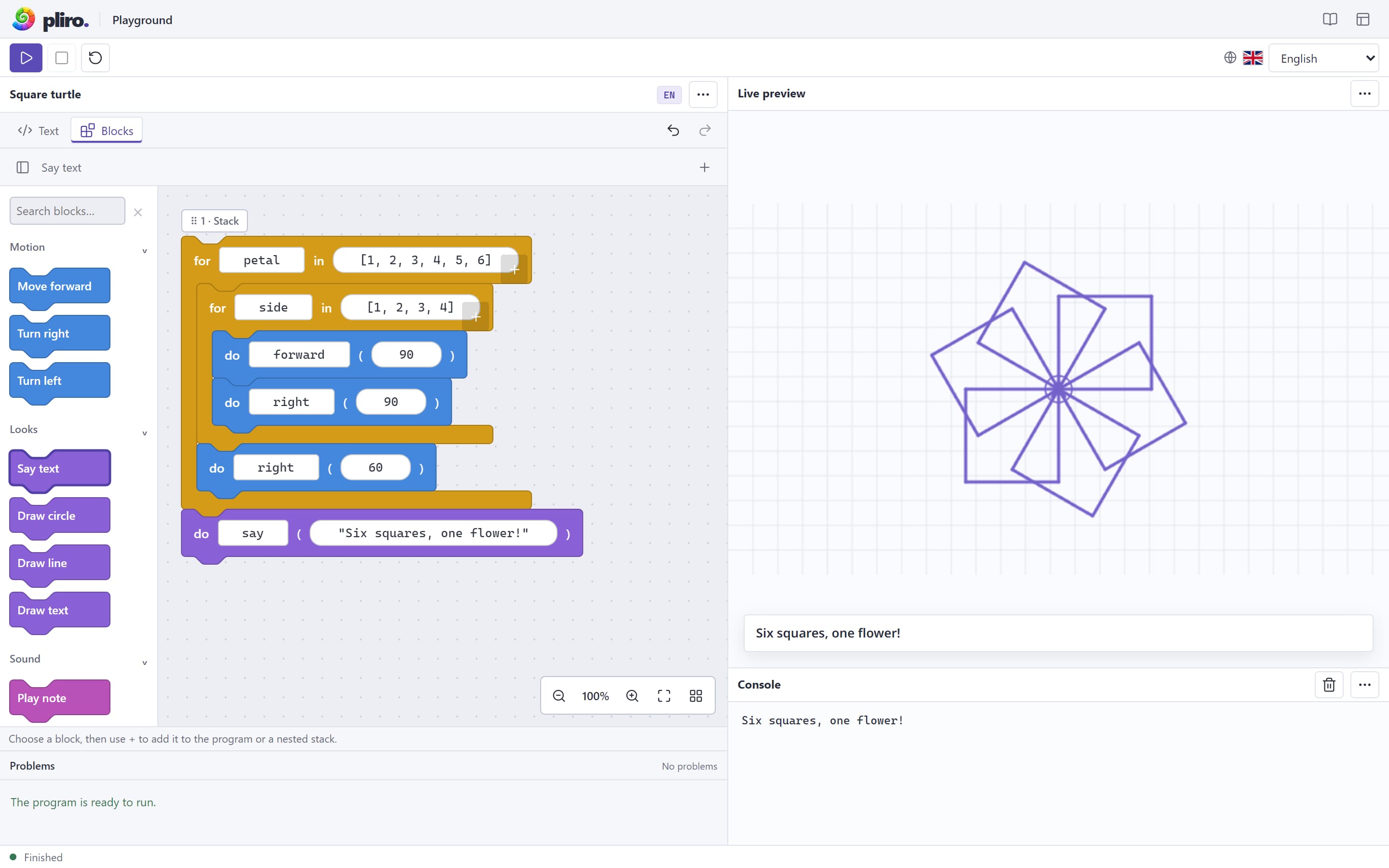
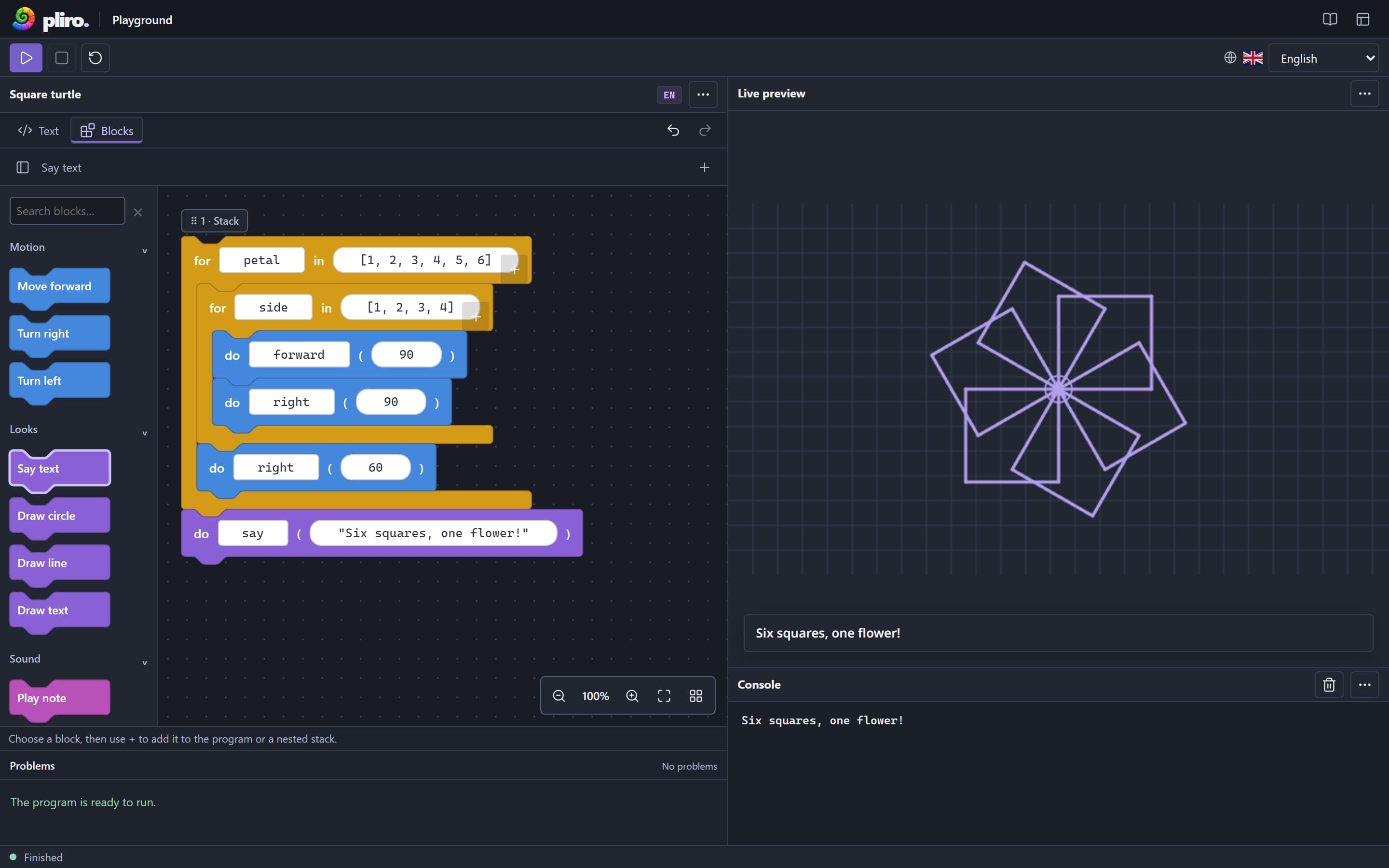
Blocks and their result side by side in the Pliro playground. Six squares make a flower.
015 min
Predict
Sketch what the code will draw.
025 min
Run
Compare the result with the prediction.
0310 min
Investigate
Work out which instructions belong together.
0415 min
Modify
Change one value and explore the difference.
0510 min
Make & explain
Create a variation and explain a choice.
Use the free Dutch teaching kit: two pupil workbooks and a teacher guide covering four 45-minute lessons. It works in the browser or with Learner and does not require a Classroom purchase.
Both annual plans support one authorised educator, lesson hosting, participant management and optional read-only program review. Classroom includes 2 IDE activations; Classroom Creator Pro includes 3.
For programming lessons01 / 02
Pliro Classroom
€149/year
Excl. VAT · billed annually
For educators hosting lessons and supporting learners in a managed Classroom environment.
Dutch and English code, visual blocks and creative projects
Local-network lesson hosting with teacher authorisation
Search, filter, approve, lock enrolment and remove participants
Read-only learner program snapshots with separate review authorisation
Up to 2 IDE activations for the named licence holder
Teacher controls and optional read-only review of learner-shared programs.
Hosting requires a Classroom subscription, a managed desktop installation and independently issued educator authorisation. A licence key alone does not enable hosting in an unconfigured download.
Program review requires separate authorisation; permission to manage lesson participation alone is insufficient.
Complete school authorisation and privacy arrangements before a pilot with children.
Creator Pro extends the educator’s development tools. It does not grant Creator Pro to every learner or replace the separate authorisation needed for Classroom hosting and program review.
Prices exclude VAT. Applicable VAT and the total are shown at checkout. Current prices, licence terms, and the full plan comparison are available in the education offer. View the current education offer
Want to explore the learning tools first?
The learning tools and Dutch teaching kit are free. In the current desktop build, joining a Classroom lesson requires a Classroom licence; a free Learner licence alone does not enable joining.
Arrange the desktop deployment, teacher authorisation and local-network access. Add separate program-review authorisation and agree school privacy arrangements before a pilot.
The described Classroom tools are available in configured deployments. Confirm installation, teacher authorisation and any separate program-review authorisation before use with a class.
PLIRO / CLASSROOM
Questions from schools
Why choose Classroom when Learner is free?
Learner includes the core learning tools, and the Dutch teaching kit is free. Classroom adds teacher hosting, participant management and optional read-only program review in a managed deployment. In the current desktop build, a free Learner licence alone does not enable joining a Classroom lesson.
Can we host a lesson immediately after buying a licence?
Hosting also requires a managed desktop installation and independently issued educator authorisation. A licence key alone does not enable it in an unconfigured download. Program review needs separate authorisation. Complete school authorisation and privacy arrangements before a pilot with children.
What can a teacher see?
Teachers see waiting and approved participants and lesson membership activity. With separate program-review authorisation, they can read a program snapshot that an approved learner has previewed and explicitly shared. This is not a live screen or code stream; files, assets and execution are not shared.
What happens when a learner changes or withdraws their code?
Ordinary edits remain local until the learner explicitly shares again. They can withdraw a snapshot while staying in the lesson, or leave. Withdrawal, removal and lesson end clear the shared copy and review, but cannot recall text already read or copied.
When should we choose Classroom Creator Pro?
Choose it when the educator also needs Creator Pro development tools, such as the full debugger, visual form designer or cross-platform native export. Classroom allows up to 2 IDE activations; Classroom Creator Pro allows up to 3. Pro applies to the educator and does not remove the managed-setup or authorisation requirements.
Do teachers need to write all the lessons themselves?
No. The free Dutch teaching kit contains two pupil workbooks and a teacher guide for four 45-minute lessons, with examples, discussion prompts and answers. It can be used in the browser or with Learner without buying Classroom.
What if our school needs several educators or more devices?
Contact Logicos with your educator, learner and device requirements. The current offer covers one authorised educator per licence and defines IDE activations for the named licence holder. Agree an appropriate school setup before ordering.
Pliro Classroom
Give programming a place in your school.
Compare the annual plans, or tell us about your educators and devices so we can help arrange the managed Classroom setup.